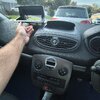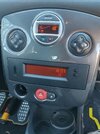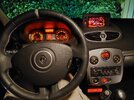
Built an OEM looking Android Auto system

Could you please share what screen did you used ? Thanks
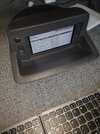
WhatsApp Image 2023-09-04 at 13.10.52.jpeg

I went for a smaller screen so i can still use the sdcard slot for the PI sd card. This screen is 5.5 inch amoled from waveshare, res of 1920x1080

When i watch movies or have navigation on the Pi 4 will get hot (espacially in hot summer sun). around 75 degrees. I drilled 3 holes of 12mm on the top of the case so the hot air can get out. It is now around 55/60 degrees.
 
Last edited:
  • Like
Reactions: Racky
Did any of you build a reverse camera connected to the PI and screen?
Nah, but plenty of other people have done this. Wouldn't be too hard. I don't see the point in a small hatchback where the back window is basically the back of the car.
 
I have had many sound systems in cars over the years, with subs in boot/under seat/ etc, now I have a D/D and 2 front door speakers. If I want far better sounds I use iPhone Or Android Red Magic Pro 8, into iFi Micro black label dap into wired earbuds, or occasionally bluetooth buds. The main reason for this, is a very noisy swirl pot in the wheel well, as the car is also a track car, and on long journeys, its ear buds, or ear plugs!.
 
Hey has anyone who has done this Raspberry Pi conversion worked out a way to get the original factory screen info to display? The reason I ask is I have the premium sound system with the 6 CD stacker in the dash. I’m not that interested in the stacker but the sound quality from the amp (under the seat) is great so I want to keep this. But whenever I disconnect my battery I need to reprogram the radio code which is done through the factory screen. Woudl be great if there was a screen that i could access whenever I need to do this.
 
Hey has anyone who has done this Raspberry Pi conversion worked out a way to get the original factory screen info to display? The reason I ask is I have the premium sound system with the 6 CD stacker in the dash. I’m not that interested in the stacker but the sound quality from the amp (under the seat) is great so I want to keep this. But whenever I disconnect my battery I need to reprogram the radio code which is done through the factory screen. Woudl be great if there was a screen that i could access whenever I need to do this.
If you do not have the tomtom display you can move the small display behind the gear stick bij extending the connector from top of dash to bottom. i bought a tomtom casing to fit the pi with screen en moved the small oem display behind the stick.
 
If you do not have the tomtom display you can move the small display behind the gear stick bij extending the connector from top of dash to bottom. i bought a tomtom casing to fit the pi with screen en moved the small oem display behind the stick.
No I don't have a Tomtom display but I did buy a factory display enclosure to fit the Pi screen. Yes I did move the factory small screen with my 9” screen on my previous Clio using a 1 DIN surround to suit the display. But I had to get rid of the dash radio. In this case I want to try to keep all the original radio setup. I could maybe get rid of the 6 CD stacker in the dash but I’m not sure if these leaves the amp working on its own under the driver seat. I'm thinking I need to keep it as I will use the source button to change to AUX to pick up Audio out from the Pi (although I may just be able to use the SWC.
 

Attachments

  • IMG_20260429_155816849_HDR.jpg
    IMG_20260429_155816849_HDR.jpg
    1.6 MB · Views: 4
  • 2025-07-23 16.03.10.jpg
    2025-07-23 16.03.10.jpg
    1.3 MB · Views: 4
No I don't have a Tomtom display but I did buy a factory display enclosure to fit the Pi screen. Yes I did move the factory small screen with my 9” screen on my previous Clio using a 1 DIN surround to suit the display. But I had to get rid of the dash radio. In this case I want to try to keep all the original radio setup. I could maybe get rid of the 6 CD stacker in the dash but I’m not sure if these leaves the amp working on its own under the driver seat. I'm thinking I need to keep it as I will use the source button to change to AUX to pick up Audio out from the Pi (although I may just be able to use the SWC.
 

Attachments

  • WhatsApp Image 2026-04-29 at 08.27.16.jpeg
    WhatsApp Image 2026-04-29 at 08.27.16.jpeg
    333.2 KB · Views: 6
OK I thought you meant where mine was. Yes down there where the AUX in is would work. I can’t see the detail but. Did you somehow fit it into the trim or is it just sitting where the cup holders are?
 
OK I thought you meant where mine was. Yes down there where the AUX in is would work. I can’t see the detail but. Did you somehow fit it into the trim or is it just sitting where the cup holders are?
i cut out a piece in the trim to slide the original display in a little bit. I also cut out a backpocket of a front seat to enclose the display so it will look nice. Maybe a nice case can be made by 3d printing.
 
i cut out a piece in the trim to slide the original display in a little bit. I also cut out a backpocket of a front seat to enclose the display so it will look nice. Maybe a nice case can be made by 3d printing.
Great I think I’m going to give that a go. I have CAD so I might order another of the 1 DIN surrounds and reverse engineer it with some extension back to suit the shape of the console in front of the cup holders.
 
  • Like
Reactions: Paul82